[Site Name]
[domain_name]
(999) 999-9999
[address1]
[address2]
[City, State Zip]
IP Video Cameras
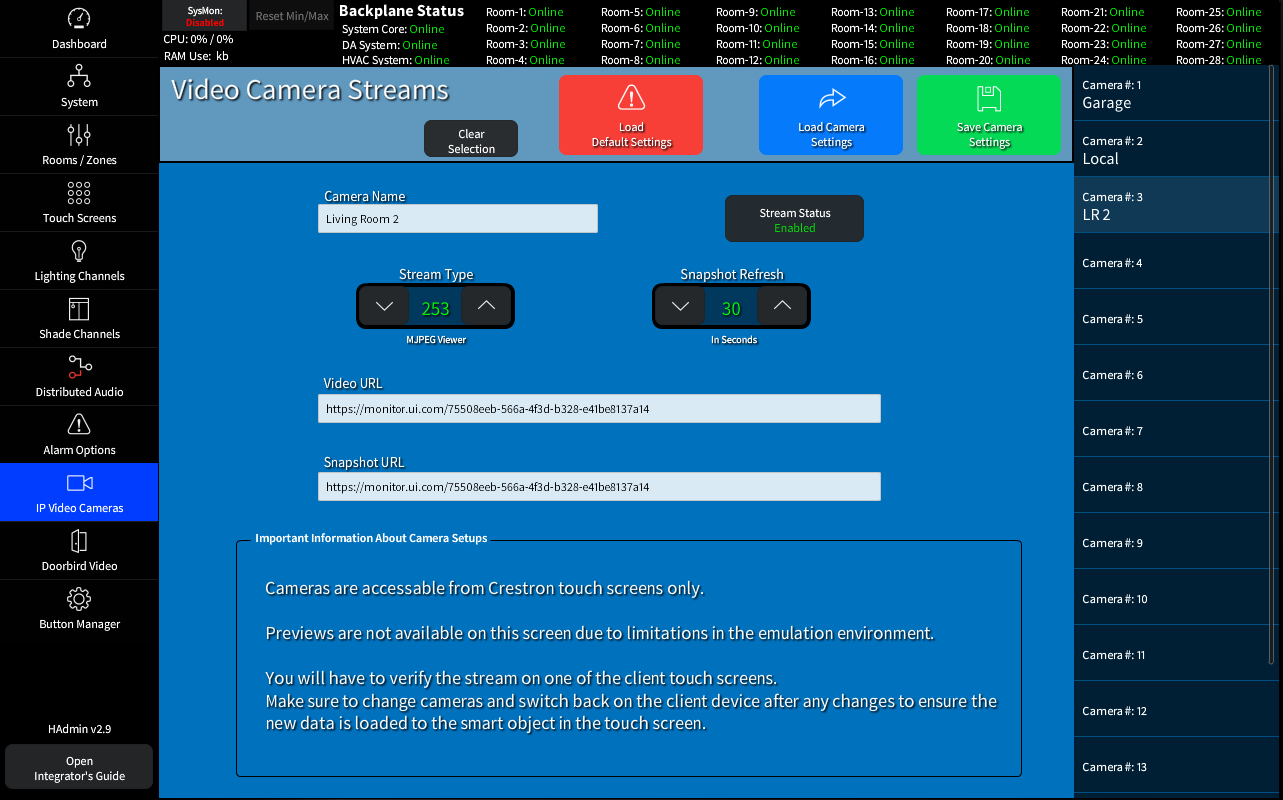
Up to 16 Video Streams can be configured for viewing on TSW Touch Panels from the System Home Page.
Once enabled the camera item will show on the TSW Home Pages, under the Cameras Button.
- Stream Types can be MPG, H.264, or Local (local camera required)
- Refresh time (in seconds) to query the SnapShot URL.
- Stream URL
This will most likely be specific to the type of camera you are using, see your Camera's Documentation - Snap Shot URL
This will most likely be specific to the type of camera you are using, see your Camera's Documentation
UniFi Protect Camera Setup
The URL generated by Protect is typically secure (RTSPS) and requires the proprietary interface.
For a generic RTSP stream without authentication that will work with the Crestron Video Smart object follow these steps
- Copy the link to the Stream URL Field: It will look something like rtsps://<Dream_Machine_IP>:7441/<Random_Key>?enableSrtp
- Change the protocol: Delete the "s" so it starts with rtsp
- Change the port: Change 7441 to 7447
- Remove the encryption key: Delete ?enableSrtp from the very end of the URL
- Set The Stream Type in the HAdmin interface to 252 (H.264)
rtsp://<Dream_Machine_IP>:7447/<Random_Key>